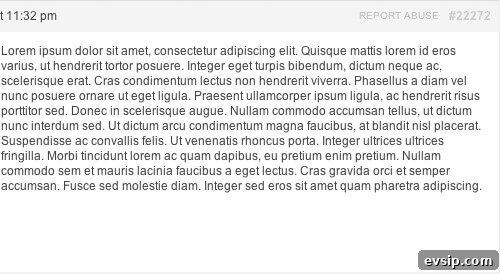
I’m using bbPress on a development project, and the client asked for a “Report Abuse” link on replies. I packaged that functionality into a lightweight plugin called bbPress Report Abuse, which adds a convenient, admin-friendly way for users to flag problematic replies.
When a visitor clicks “Report Abuse” next to a reply, they are taken to a dedicated report form. The form includes a “Reported URL” field that is populated automatically so administrators can identify the exact reply being reported. That makes moderation faster and more accurate, since moderators get a direct link to the content in question.
This plugin isn’t hosted on the WordPress.org repository because it integrates with a premium form plugin (Gravity Forms). The installation requires a few manual steps beyond the typical Activate action, and posting it on WordPress.org would likely generate many support questions about setup and dependencies.
For developers new to building plugins, bbPress Report Abuse demonstrates several solid practices for clean, maintainable WordPress development:
- Implemented as a class to keep the plugin file organized and avoid global namespace collisions. Packaging functionality into a class reduces the risk of function name conflicts with themes or other plugins.
- Uses context-aware hooks and filters so code runs only when needed. For example, bbPress-specific logic is hooked to bbPress filters, preventing the plugin from executing code on sites that don’t run bbPress.
- Exposes filters for common customizations, such as changing the link text or the report page URL. Instead of relying solely on a translation textdomain for a single, commonly customized string, the plugin provides a filter so site owners can modify the label easily (for instance, to “Report Inappropriate Content”).
Download bbPress Report Abuse from GitHub | View All of My Plugins
Installation
- Download the plugin and install it on your WordPress site following standard plugin installation procedures.
- Create a page titled “Report Abuse” and set its URL slug to
report-abuse(so the full page path is usually /report-abuse). You can change this slug later via the plugin filter if you prefer a different URL. - Create a Gravity Form to collect report details. Add fields appropriate for your moderation workflow. One field should be used for the reported message URL. In that field’s settings, open the Advanced tab, enable “Allow field to be populated dynamically,” and specify
bbp_report_abuseas the parameter name. This lets the plugin auto-fill the reported URL when a user clicks the Report Abuse link. - Embed the Gravity Form on the Report Abuse page you created in step 2.
How it works
The plugin adds a “Report Abuse” link to bbPress replies. That link points to your designated report page and includes the reply URL as a query parameter. When the user lands on the report page, Gravity Forms reads that parameter and fills the field you designated for the reported URL. Moderators and administrators receive reports that include the direct permalink to the reply, which streamlines review and action.
Customization Filters
Two filters are provided to tailor the plugin to your site without editing core plugin files:
bbpress_report_abuse_label— Change the link text visible to users. Default: “Report Abuse”. Use this to display alternative phrasing such as “Flag Reply” or “Report Inappropriate Content”.bbpress_report_abuse_url— Adjust the target URL for the report form if you don’t want to use the default/report-abusepage.
Notes and best practices
- Keep Gravity Forms up to date and ensure the form field parameter is set correctly so the reported URL populates reliably.
- If you change the Report Abuse page slug, update the
bbpress_report_abuse_urlfilter or the plugin settings accordingly so links continue to work. - Consider adding moderation workflows and notifications so the right team members are alerted when a report is submitted. Gravity Forms supports notifications, conditional logic, and entry management to help build that workflow.
bbPress Report Abuse is intentionally small and focused: it provides a clear path for users to flag content and delivers the key information moderators need to act. The plugin’s structure also makes it easy to extend: add additional filters or hooks as needed, or adapt the form fields to match your moderation process without modifying the plugin core.